AI Development & Automation Government & Public Sector
SRA Mitra - AI-Powered Employee Training Platform
Transforming Government Employee Training with Smart Video Learning and AI Assistance
Client: Government Department
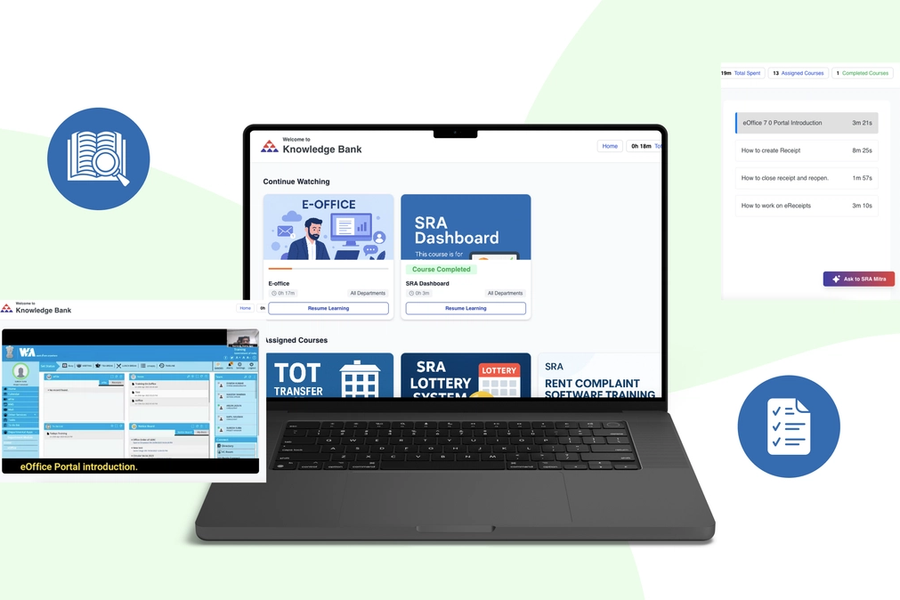
Transforming Government Employee Training with Smart Video Learning and AI Assistance
A large government department with multiple sub-departments, each requiring specialized training and skill development. With thousands of employees across various roles and locations, ensuring consistent training delivery, tracking progress, and maintaining compliance with training requirements was becoming increasingly complex and resource-intensive.
The government department was struggling to provide effective training to their diverse workforce. With multiple portals, varying access requirements, and manual processes, the training system was inefficient and difficult to manage at scale.
Critical Pain Points:
Fragmented Training Systems: Multiple separate portals for different departments causing confusion. Each portal required separate login credentials and navigation. No unified view of employee training across the organization. Course materials scattered across different platforms. Employees unsure which portal to access for their training. IT overhead maintaining multiple disconnected systems.
Access Control Complexity: Different departments needed access to different courses. Manual process to grant and revoke course access. No automatic assignment based on employee department. Security concerns with blanket access to all content. Difficulty managing temporary access for transferred employees. Administrative burden tracking who should access what.
Video Course Management Difficulties: Training content created as video courses similar to Udemy/Udacity format. Hundreds of videos uploaded without organized structure. No way to group videos into cohesive courses. Manual tracking of which videos belong to which course. Version control issues when updating course content. Difficulty organizing content by skill level or topic.
No Learning Support During Videos: Employees watching complex technical or procedural videos. Questions arising during video playback with no immediate help. Had to pause video, email instructor, wait for response. Broke learning flow and reduced comprehension. Many employees gave up when concepts seemed difficult. No way to clarify doubts in real-time during learning.
Progress Tracking Nightmare: No visibility into who's watching what courses. Cannot track if employees completing assigned training. Manual follow-up required to ensure compliance. No data on time spent learning per employee. Unable to identify employees struggling with courses. Department heads had no insight into team's skill development.
Certificate Management Burden: Manual certificate creation for course completion. Administrators spending hours designing and issuing certificates. Delay between course completion and certificate receipt. No standardization in certificate format. Difficulty maintaining records of issued certificates. Manual verification when employees claim completion.
Lack of Analytics and Insights: No data on course effectiveness or engagement. Cannot identify which courses need improvement. Unable to see patterns in learning behavior. No reports for management on training ROI. Missing information on knowledge gaps across departments. Decision-making based on guesswork, not data.
Continue Watching Feature Missing: Employees had to remember where they left off in videos. Frustration restarting videos from beginning each time. Lost progress when switching between devices. No bookmarking or progress saving. Reduced completion rates due to inconvenience. Wasted time re-watching already seen content.
We built SRA Mitra - a comprehensive, unified training platform that consolidates all training portals, automates course management, provides AI-powered learning assistance, and delivers complete analytics for training effectiveness.
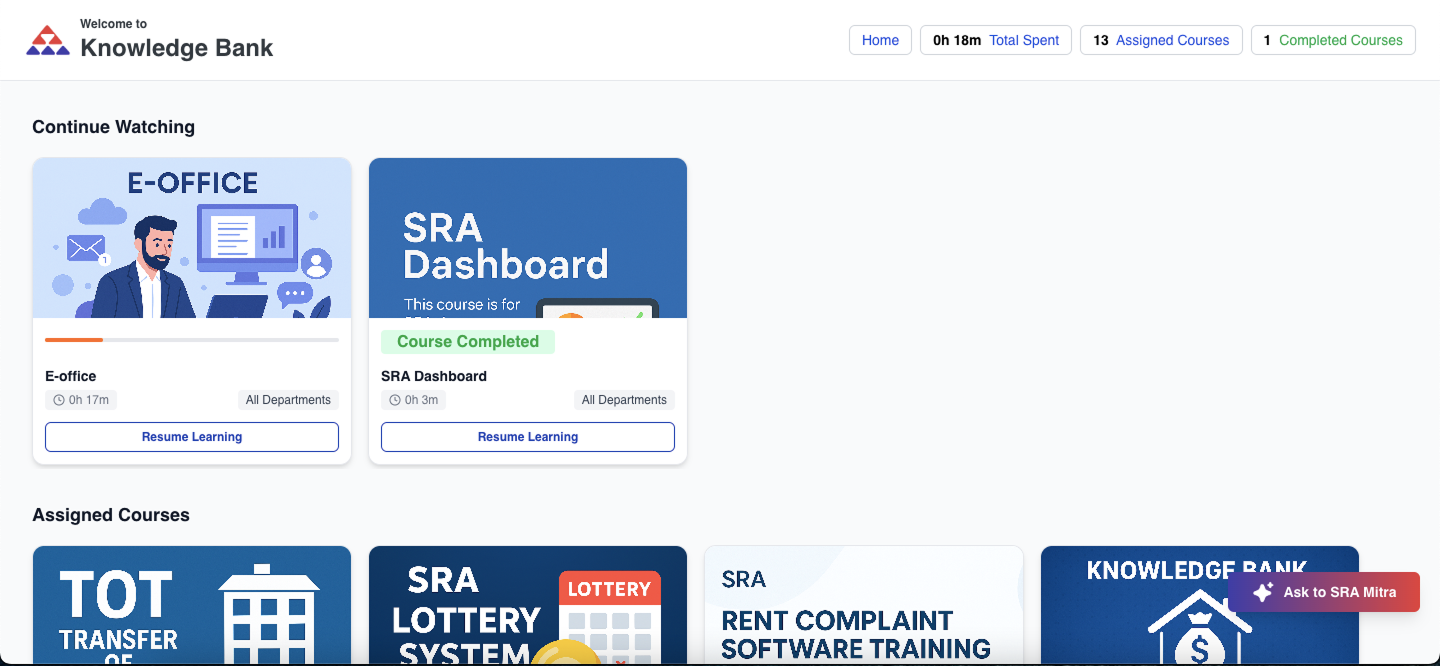
Personalized dashboard with assigned courses, progress tracking, and AI learning assistant.
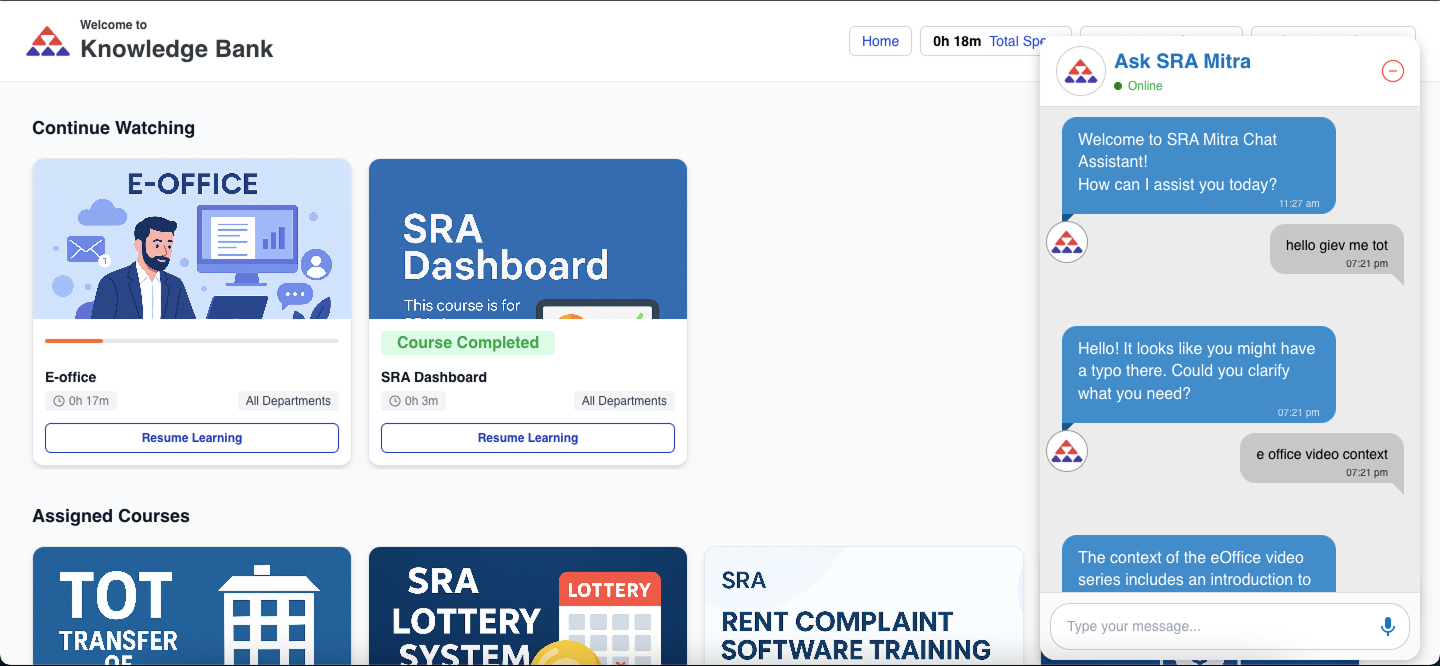
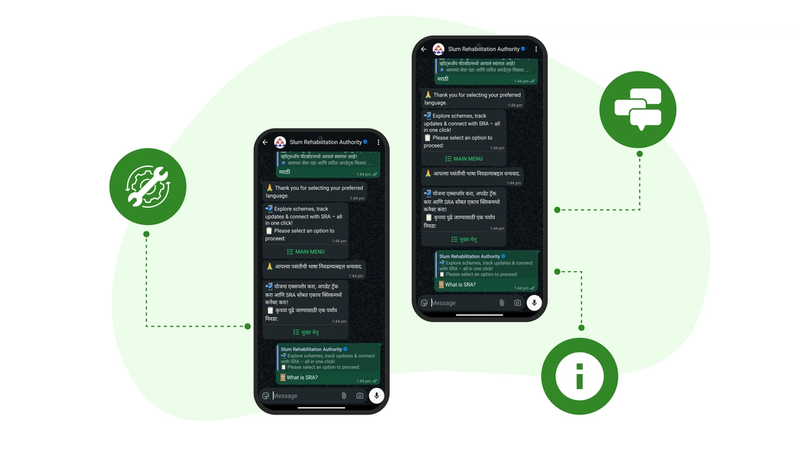
Integrated AI chatbot providing real-time clarification during video playback.
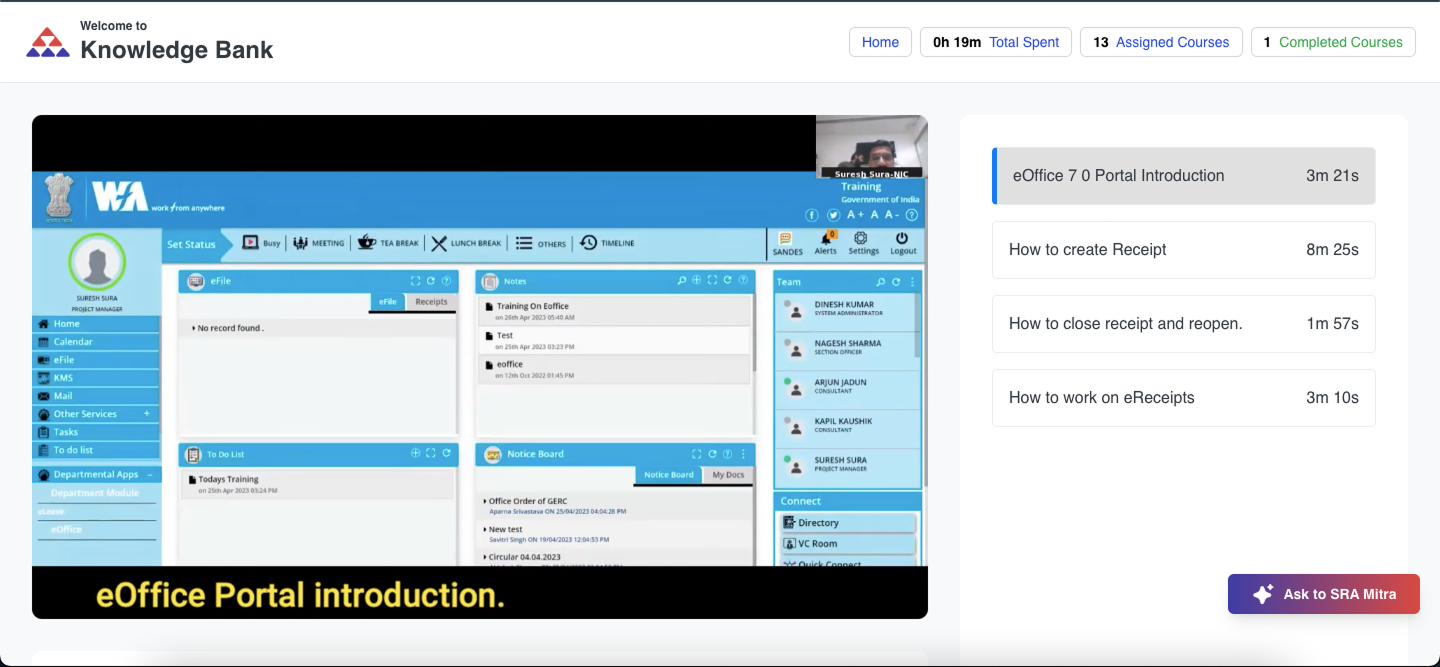
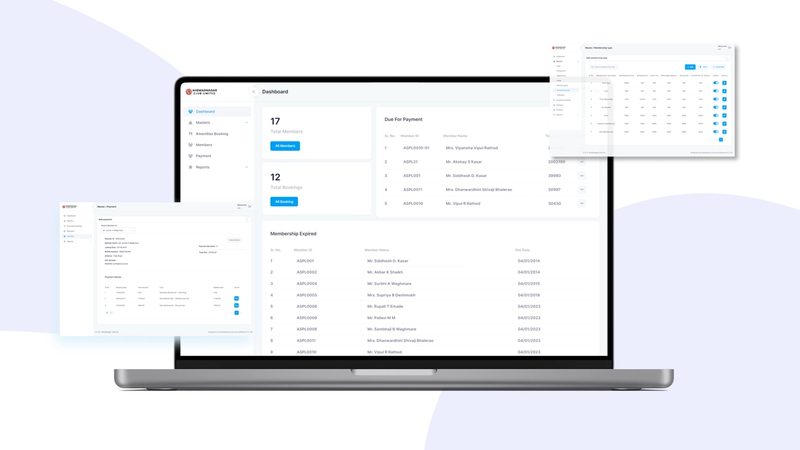
Comprehensive analytics dashboard tracking employee learning progress and course effectiveness.
Unified Learning Portal
Single platform replacing multiple fragmented portals.
Single Sign-On Access: One login for all training needs across departments. Integration with government employee directory. Automatic profile creation for new employees. Role-based dashboard showing relevant information. Seamless access from desktop and mobile devices. Secure authentication with government standards compliance.
Department-Based Course Access: Courses automatically visible based on employee's department. Dynamic access updates when employees transfer departments. Combination of department-wide and role-specific courses. Guest access for temporary staff with limited permissions. Hierarchical access for managers to view team courses. Cross-department course sharing when authorized.
Personalized Learning Dashboard: Clean, intuitive interface showing assigned courses. Progress indicators for each course at a glance. Recommended courses based on role and department. Recently watched videos for quick access. Upcoming mandatory training deadlines highlighted. Achievement badges and completion statistics.
Mobile-Responsive Design: Optimized experience on smartphones and tablets. Video playback optimized for mobile data. Offline video download for learning without internet. Touch-friendly navigation and controls. Responsive layout adapting to any screen size. Native app-like experience in web browser.
Video Course Management
Professional course creation and organization system.
Structured Course Builder: Create courses with multiple video modules. Organize videos in logical learning sequence. Add course descriptions, objectives, and prerequisites. Set course duration and difficulty level. Assign instructors and subject matter experts. Preview courses before publishing to employees.
Video Upload and Processing: Support for various video formats and sizes. Automatic video compression for optimal streaming. Thumbnail generation for video previews. Quality selection for different bandwidth conditions. Batch upload for multiple videos. Metadata extraction and organization.
Course Assignment System: Assign courses to entire departments with one click. Individual assignment for specialized training. Mandatory vs optional course designation. Deadline setting for compliance training. Automatic enrollment for new department employees. Bulk assignment operations for efficiency.
Multi-Format Content Support: Video lectures as primary content. PDF supplementary materials and handouts. Quizzes and assessments within courses. External resource links for further reading. Downloadable course materials. Interactive elements for engagement.
Content Organization: Course categories and tags for easy discovery. Search functionality across all courses. Filter by department, topic, duration, difficulty. Course ratings and reviews from employees. Popular and trending courses highlighting. Custom course collections and playlists.
AI-Powered Learning Assistant
Revolutionary RAG chatbot integrated directly into video player.
Video Content Understanding: AI processes and understands entire video content. Analyzes video transcripts, visuals, and context. Learns key concepts, terminologies, and explanations. Builds knowledge base from all course videos. Continuously updated as new content added. Understands instructor's teaching style and emphasis.
Real-Time Clarification During Playback: Chat button visible alongside video player. Ask questions without pausing or leaving video. Instant responses while video continues playing. Context-aware answers based on current video timestamp. Understands what specific part of video you're asking about. Maintains conversation history throughout learning session.
Intelligent Question Answering: Handles questions in natural conversational language. "What does this technical term mean?", "Can you explain this concept again?", "Give me an example of this procedure". Provides simplified explanations for complex topics. Offers additional examples and analogies. Links to related course sections for deeper understanding.
Citation and References: Answers reference specific parts of the video. Shows timestamp where concept was explained. Links to exact moment in video for review. Provides external references for further learning. Suggests related videos covering similar topics. Complete transparency in answer sources.
Learning Support Features: Summarizes complex video sections on request. Creates bullet-point notes from video content. Generates study guides from course material. Quizzes user on concepts to test understanding. Tracks commonly asked questions for course improvement. Multilingual support for diverse workforce.
Contextual Help: Understands context from previous questions in session. Remembers what videos you've watched. Provides answers building on prior explanations. Recognizes when you need basic vs advanced explanation. Adapts responses to your learning pace. Suggests prerequisite content if needed.
Continue Watching Feature
Seamless learning experience across sessions and devices.
Automatic Progress Tracking: System remembers exact position in every video. Syncs progress across devices in real-time. Resume from where you left off automatically. Progress saved even if browser crashes. Completed sections clearly marked. Visual progress bar showing course completion.
Smart Bookmarking: Bookmark important moments in videos. Add personal notes to bookmarks. Return to bookmarked sections easily. Share bookmarks with colleagues. System suggests commonly bookmarked sections. Review bookmarks before assessments.
Watch History: Complete history of all watched videos. Rewatch any previous video easily. Track your learning journey over time. See time spent on each course. Identify areas needing more attention. Export watch history for records.
Multi-Device Sync: Start on desktop, continue on mobile seamlessly. Real-time synchronization of progress. Offline viewing with sync when connected. Device-independent learning experience. No data loss switching devices. Automatic conflict resolution for simultaneous access.
Admin Panel & Analytics
Comprehensive management and reporting system.
Employee Learning Dashboard: Real-time view of all employee learning activities. Individual employee progress and completion rates. Department-wise learning statistics. Course-wise enrollment and completion data. Active learners vs inactive employees identification. At-risk employees needing intervention.
Time Tracking Analytics: Total time each employee spent learning. Average daily/weekly learning time per person. Time spent per course and video. Detailed session logs with timestamps. Peak learning hours identification. Productivity patterns and trends.
Course Completion Reports: Completion rates for each course. Average time to complete courses. Department-wise completion comparison. Identify courses with low completion rates. Mandatory training compliance tracking. Deadline adherence monitoring.
Learning Outcome Metrics: Assessment scores and quiz results. Skill improvement tracking over time. Knowledge gap identification by department. Course effectiveness measurement. Employee performance correlation with training. ROI calculation for training programs.
Custom Report Generation: Flexible report builder for any metric. Date range selection for time-based analysis. Export to Excel, PDF for sharing. Scheduled automated reports via email. Visual charts and graphs for presentations. Drill-down capabilities for detailed analysis.
Certificate Management: Automatic certificate generation on course completion. Professional certificate templates with branding. Employee name, course name, completion date automatically filled. Digital signatures and verification codes. Email delivery of certificates instantly. Certificate repository for all issued certificates.
Department Management: Add/remove departments and sub-departments. Manage department hierarchy and structure. Assign department administrators. Configure department-specific settings. Bulk employee import and assignment. Department-wise training requirements configuration.
Content Management Tools: Approve or reject uploaded videos. Edit course details and structure. Archive outdated courses. Monitor content quality and relevance. User feedback and rating management. Version control for course updates.
Frontend Application: React-based modern web application. Responsive design for all devices. Progressive Web App capabilities. Optimized video player with custom controls. Real-time chat interface with AI. Beautiful, government-standard compliant UI.
Backend Services: Node.js handling all API requests. Scalable microservices architecture. Real-time data synchronization. Efficient video streaming service. Background job processing for analytics. RESTful APIs for integration.
AI RAG System: Python-based RAG pipeline for video content. Video transcript extraction and processing. Semantic understanding of educational content. Vector database for fast retrieval. LLM integration for natural responses. Continuous learning from interactions.
Video Processing: Automated video transcoding pipeline. Multiple quality levels generation. Thumbnail and preview creation. CDN distribution for fast delivery. Adaptive bitrate streaming. Progress tracking integration.
Database: MongoDB storing user data and progress. Video metadata and course structure. Analytics data and reports. Certificate records and templates. User sessions and activity logs. High-performance queries for dashboards.
Cloud Infrastructure: AWS hosting with global distribution. S3 for video and document storage. CloudFront CDN for fast video delivery. Auto-scaling for peak usage. Automated backups and disaster recovery. Security and compliance controls.
Learning Efficiency
- 75% reduction in time spent seeking clarification for concepts - Instant AI assistance eliminating email back-and-forth with instructors - Continue watching feature saving 20+ hours monthly across organization - Real-time doubt resolution improving comprehension and retention - Course completion rates increased by 60%
Administrative Time Savings
- 90% reduction in certificate issuance time (days to seconds) - Automatic course assignment eliminating manual access management - 40 hours monthly saved on progress tracking and reporting - Zero time spent managing multiple portals - Automated compliance tracking and deadline monitoring
Training Effectiveness
- 10,000+ hours of learning engagement monthly - 5,000+ AI queries answered helping employees understand concepts - 2,000+ certificates issued showing skill development - 40% improvement in assessment scores with AI assistance - Better knowledge retention through interactive learning
System Consolidation
- Single platform replacing 5+ separate training portals - Unified access eliminating login confusion - Reduced IT support tickets by 70% - Lower infrastructure costs with consolidated system - Easier maintenance and updates
Data-Driven Decisions
- Complete visibility into training effectiveness - Identify courses needing improvement through analytics - Proactive intervention for struggling employees - Department-wise skill gap analysis - ROI tracking for training investments
Employee Experience
- Modern, intuitive interface boosting engagement - Mobile learning enabling flexible schedules - AI assistance building confidence in learning - Gamification through certificates and achievements - Professional development tracking motivating employees
Compliance & Governance
- 100% tracking of mandatory training completion - Automated deadline alerts preventing lapses - Audit-ready reports for compliance verification - Secure access controls protecting content - Complete activity logs for accountability
1. AI Integration Innovation: First-in-class AI chatbot integrated directly into video player. Real-time learning assistance without interrupting flow. Video content understanding enabling contextual help. Revolutionary approach to online learning support. Built specifically for government training needs.
2. Unified Platform Approach: Eliminated portal fragmentation completely. Single source of truth for all training. Reduced complexity for employees and administrators. Easier to maintain and enhance one system. Significant cost savings from consolidation.
3. Department-Based Intelligence: Automatic access control based on organizational structure. Dynamic updates reflecting department changes. Reduced administrative overhead dramatically. Ensured right content reaches right people. Scalable across any organizational hierarchy.
4. Comprehensive Analytics: Beyond basic completion tracking to deep insights. Actionable data for training improvement. Real-time visibility enabling proactive management. Custom reporting meeting diverse needs. Evidence-based training program optimization.
5. Continue Watching Excellence: Seamless multi-device learning experience. Smart progress tracking and bookmarking. Eliminated major friction point in online learning. Improved completion rates significantly. User experience matching consumer streaming platforms.
6. Automated Certificate System: Instant gratification for course completion. Professional quality without manual effort. Complete audit trail of certifications. Digital verification preventing fraud. Motivational tool for employee engagement.
Video Content Processing at Scale: Processing hundreds of hours of video content for AI. Extracting accurate transcripts from diverse audio quality. Understanding domain-specific government terminology. Building comprehensive knowledge base from videos. Optimized pipeline for new content addition.
Real-Time AI Response Performance: Delivering instant answers during video playback. Context understanding from current video position. Managing concurrent AI queries from many users. Balancing accuracy with response speed. Infrastructure optimization for performance.
Multi-Department Access Logic: Complex permission rules across departments. Handling cross-department access exceptions. Dynamic access on employee transfers. Temporary access for special projects. Role hierarchy and inheritance. Achieved through careful database design.
Progress Synchronization: Real-time sync across multiple devices. Handling offline learning with eventual sync. Conflict resolution for simultaneous access. Maintaining accuracy in progress tracking. Network resilience and retry mechanisms.
Government Security Standards: Meeting stringent security and compliance requirements. Data sovereignty and privacy regulations. Audit logging and activity tracking. Secure video storage and delivery. Regular security assessments and certifications.
User Adoption: Transitioning from multiple familiar portals to new system. Training administrators on new capabilities. Communicating benefits to employees. Gradual rollout minimizing disruption. Success through excellent UX and clear value demonstration.
While built for government training, SRA Mitra's approach applies widely.
Corporate Training: Employee onboarding and skill development programs. Sales training with product knowledge videos. Compliance training with certification tracking. Leadership development courses. Technical skills training for IT teams.
Educational Institutions: Online courses and distance learning programs. Supplementary material for classroom teaching. Professional certification courses. Student progress monitoring. Automated grading and certification.
Healthcare Training: Medical procedure training videos. Continuing medical education (CME) courses. Nursing skills development. Hospital protocol training. Patient care best practices.
Manufacturing: Equipment operation training. Safety procedure videos. Quality control training. New employee onboarding. Maintenance and troubleshooting guides.
Any Organization with Training Needs: If your organization provides video-based training, SRA Mitra's AI-assisted learning and comprehensive management can transform effectiveness.
If your organization struggles with fragmented training systems, lacks visibility into learning effectiveness, or wants to enhance employee skill development, SRA Mitra demonstrates how technology can transform training delivery.
What We Can Build For You:
Video-based learning platforms, AI-powered learning assistants, course management systems, employee training portals, certification automation, learning analytics dashboards, mobile learning applications, and custom integrations.
Effective training is the foundation of organizational excellence. By combining intelligent course management, AI-powered learning assistance, and comprehensive analytics, organizations can transform training from a compliance burden into a strategic advantage.
The future of corporate and government training isn't just delivering content - it's creating engaging, personalized learning experiences that adapt to each employee's needs, provide real-time support, and deliver measurable outcomes.
SRA Mitra proves that with the right technology, training can be efficient, effective, and enjoyable - driving both employee development and organizational success.
Explore more of our work